cPanel
This document will help you to update your project using cPanel. At the very first login to your cPanel account.
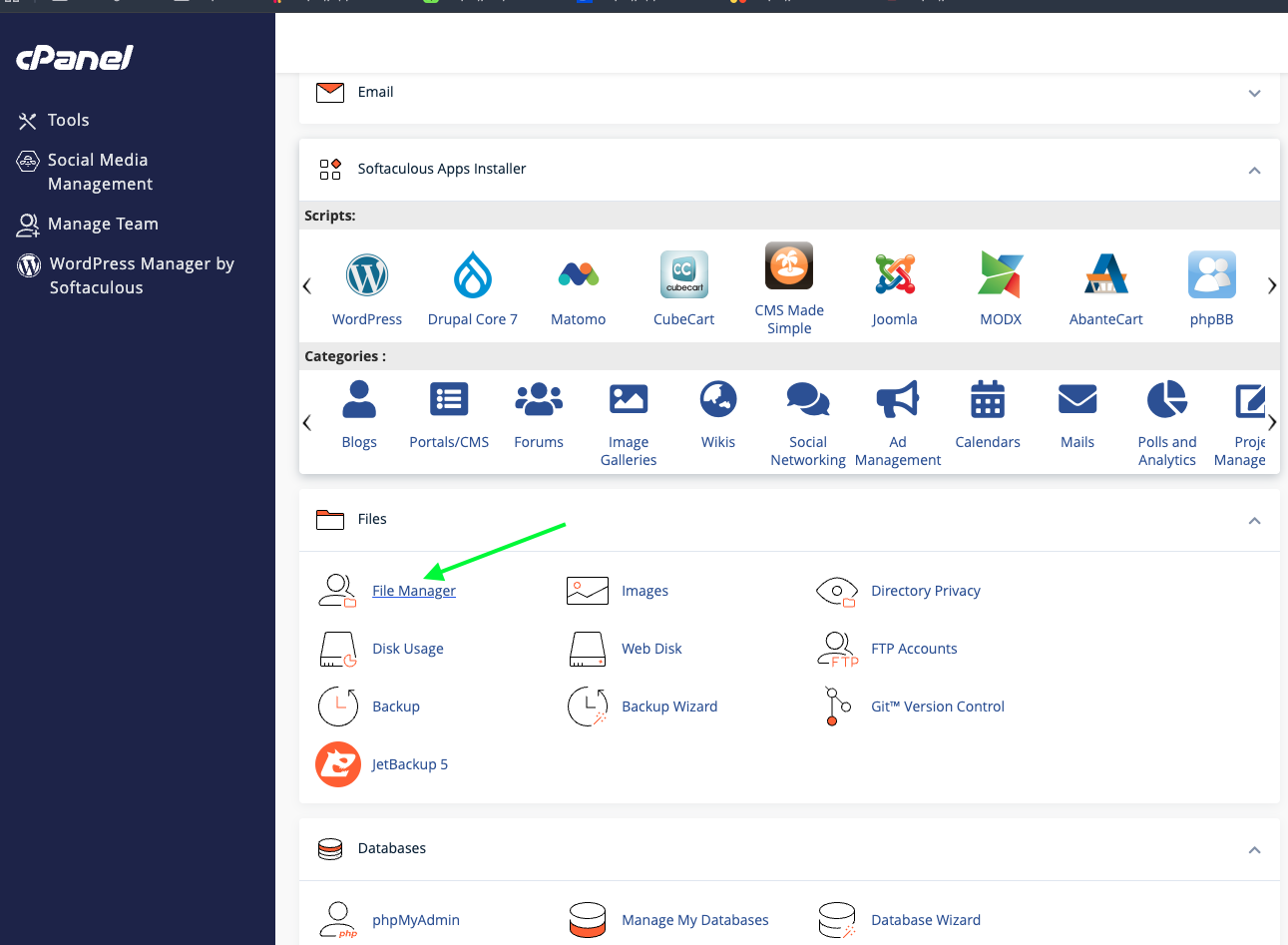
Then go to the project directory and click on the File Manager.
Admin Panel Update
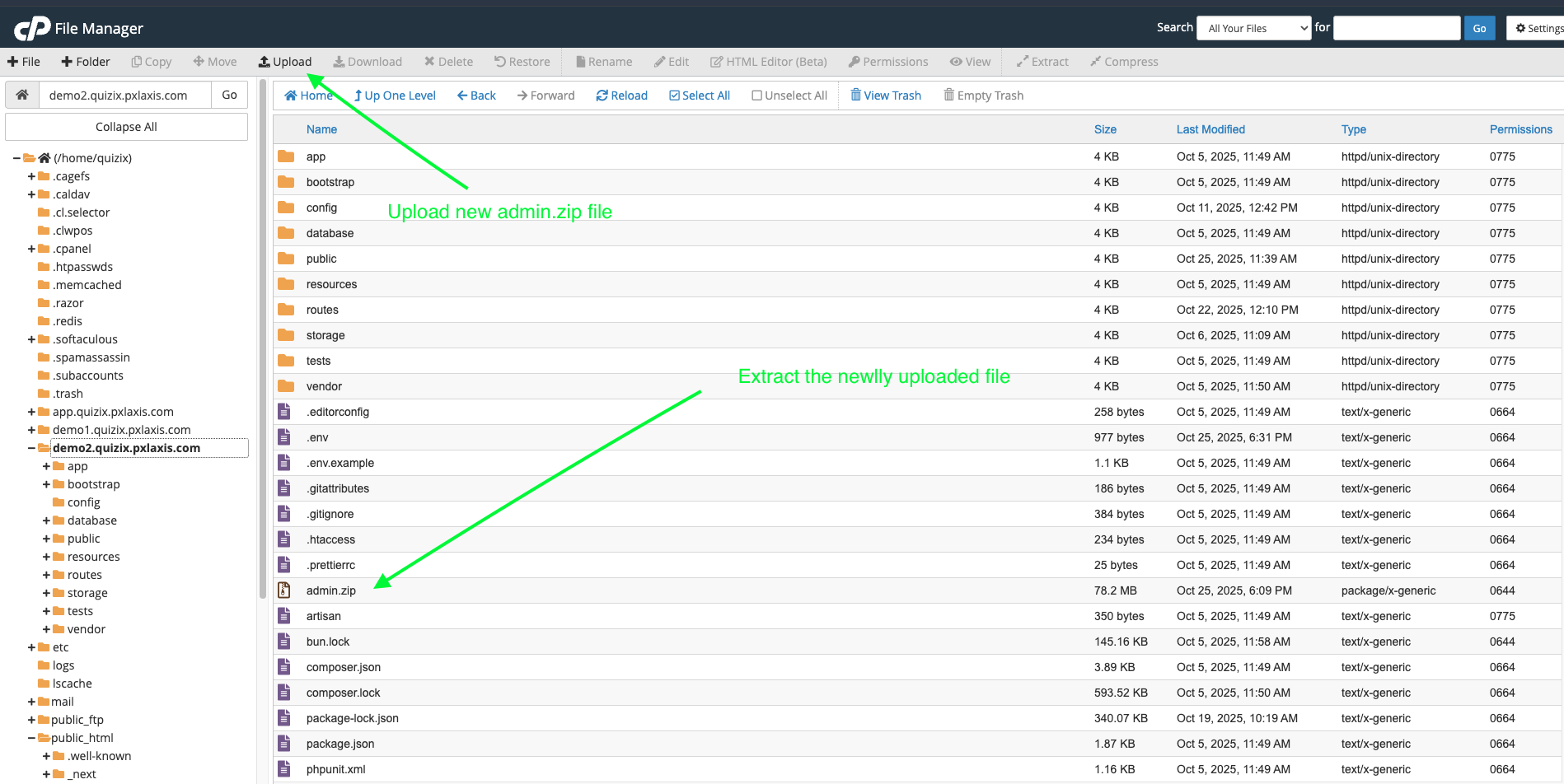
Now go to admin panel project directory. Now upload the admin.zip file and extract it.
This will replace your old admin panel files.
Clear Cache
Now go to your admin panel and login to it and then go to Extra menu on bottom and click on Info menu.
Clear the cache
Note: It's importent to clear the cache to make sure that the new update is loaded.
Frontend Update
If you have deploy to vercel or netlify using github, then the go with github update guide and github will deploy automatically.
If you have use to deploy frontend as static-client.zip then follow the steps below.
Step 1: Find the static export file
On the core folder you will see have static-client.zip file. Extract the zip file.
and Go to project root directory,
Step 2: PWA Setup
- Open the
src/app/manifest.webmanifestfile and remove thestart_urlfield.
{
    "name": "My Next.js Application",
    "short_name": "Next.js App",
    "description": "An application built with Next.js",
    "start_url": "/",
    "display": "standalone",
    "background_color": "#ffffff",
    "theme_color": "#000000",
    "icons": [
        {
            "src": "/fb-logo.png",
            "sizes": "192x192",
            "type": "image/png"
        },
        {
            "src": "/fb-logo.png",
            "sizes": "192x192",
            "type": "image/png"
        }
    ]
}
update all the value according to your needs. also on the icons section you can add more icons.
Node: All the icons should be the size of 192x192. If you want to add more icons, you can add them in the icons array. All the icons upload on public folder. Make sure that all the icons are of the same size and type also make sure that name is correct as per the manifest file.
Step 3: Setup the ENV file
-
Copy the
.example.envfile to.envfile end edit the file. -
Add the following variables to the
.envfile:
NEXT_PUBLIC_API_BASE_URL=http://app.example.com
NEXT_PUBLIC_TOKEN_NAME=token
NEXT_PUBLIC_BASE_URL=http://example.com
Note: Before the adding your API_BASE_URL which you admin url check that is working fine. Example (app.domain.com). If not, then you will get error on the client side when you try to build the app.
Step 4: Build the app for production
- Install the dependencies using
npm install
npm install --force
- Build the app for production:
npm run build
We use sharp package for image optimization. If you get error on sharp package then remove the sharp package from the package.json file.
"dependencies": {
"sharp": "^0.32.1", #remove this line
}
Then remove the node_modules folder and package-lock.json file. Then run the npm install --force command again and build the app again.
npm run build
Step 5: Zip the out folder
- Go to the
outfolder. - Select all the files and compress them as out.zip file.
Step 6: Upload the out.zip file to cPanel
- Upload the out.zip file to cPanel.
Step 7: Add .htaccess file
Now add the .htaccess file to your cPanel and add the following code:
<IfModule mod_rewrite.c>
    Options +FollowSymLinks -MultiViews

    RewriteEngine On

    RewriteCond %{REQUEST_FILENAME} -d
    RewriteRule ^(.*)/$ $1.html

    RewriteCond %{REQUEST_FILENAME}.html -f
    RewriteRule !.*\.html$ %{REQUEST_FILENAME}.html [L]

    RewriteCond %{REQUEST_FILENAME} !-d
    RewriteCond %{REQUEST_FILENAME}\.html -f
    RewriteRule ^(.*)$ $1.html [NC,L]

    # Protect some contents
    RewriteRule ^.*/?\.git+ - [F,L]

    RewriteCond %{ENV:HTTPS} !on
    RewriteRule ^(.*)$ https://%{HTTP_HOST}%{REQUEST_URI} [L,R=301]
</IfModule>
Copy the above code to your .htaccess file and save it.
Most of the cpanel work with this .htaccess file. But if you face any issue then use the below code for like (KeyWeb).
<IfModule mod_rewrite.c>

    RewriteEngine On

    RewriteCond %{REQUEST_FILENAME} -d
    RewriteRule ^(.*)/$ $1.html

    RewriteCond %{REQUEST_FILENAME}.html -f
    RewriteRule !.*\.html$ %{REQUEST_FILENAME}.html [L]

    RewriteCond %{REQUEST_FILENAME} !-d
    RewriteCond %{REQUEST_FILENAME}\.html -f
    RewriteRule ^(.*)$ $1.html [NC,L]

    # Protect some contents
    RewriteRule ^.*/?\.git+ - [F,L]
</IfModule>